Early Black Friday in cart discounts!
  • Amazon
  • American Express
  • Apple Pay
  • Diners Club
  • Discover
  • Google Pay
  • Mastercard
  • PayPal
  • Shop Pay
  • Visa
Free shipping on all projectors. Tax-exempt purchasing available in your cart.

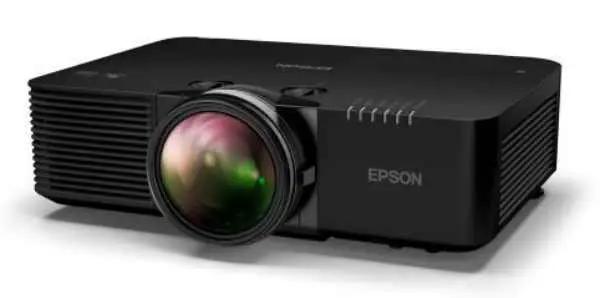
Epson PowerLite L695SE 6000 Lumen 4K Short Throw Laser Projector

SKU: V11HB36120
Regular price $5,710.00

Frequently Asked Questions

A strong choice is a 4K short-throw laser projector with at least 6,000 lumens, flexible installation tools, and business-grade connectivity. The Epson PowerLite L695SE fits that profile well because it combines 4K Enhancement, 6,000 lumens of brightness, a short-throw ratio of 0.5 to 0.7, and 3-chip 3LCD imaging for full-color brightness. That combination matters in conference rooms, classrooms, and hybrid workspaces where ambient light is difficult to control and the projector needs to sit closer to the screen. It also includes horizontal and vertical lens shift, geometric correction tools, HDBaseT, HDMI, wired network control, and Wi-Fi 6 and 6E support, which makes it practical for professional installations. The best option depends on the room. If you need large, sharp images at a short distance without sacrificing brightness, this model is especially well suited. If your priority is a home theater in a dark room, you may want to compare it with models tuned more specifically for cinema contrast rather than commercial brightness and installation flexibility.
Yes, short throw projectors are often an excellent fit for conference rooms and classrooms because they create a large image from a shorter distance. That helps in spaces where the projector cannot be mounted far back, and it reduces the chance of presenters casting shadows or looking directly into the light beam. The Epson PowerLite L695SE is a good example of why this category works well. Its 0.5 to 0.7 throw ratio allows it to project a large image while being placed much closer to the screen than a standard projector. It also delivers 6,000 lumens, which is useful in rooms with lights on, and includes lens shift plus geometric correction tools like point correction, arc correction, edge blending, and Quick Corner for easier setup. Short throw models are especially helpful in collaborative spaces, training rooms, and hybrid work environments. The main tradeoff is that placement and screen alignment become more important than with some longer-throw projectors. In a professional installation, though, the reduced shadows and better space efficiency are usually worth it.
They serve different purposes. A 4K TV usually delivers higher native contrast and a more controlled image in smaller sizes, while a 4K projector is better when you need a much larger image and more installation flexibility. For presentations, collaboration, training, and large-room viewing, a projector can be the better tool. The Epson PowerLite L695SE is designed for that larger-format use case. It uses 4K Enhancement for sharper detail than standard HD, offers 6,000 lumens for bright environments, and uses 3-chip 3LCD technology, which helps maintain strong color brightness. In a conference room or classroom, those benefits can matter more than the TV-style advantages of a smaller display. A projector is the better fit if you need a large screen size, short throw placement, or integration into a professional AV system. A TV may still be preferable in a small room where image size is modest and lighting is fully controlled. For business and education spaces, the projector often wins on scale, placement flexibility, and collaboration value.
Laser projectors offer long-life light sources and low maintenance, but they still have tradeoffs. The main downsides can include higher upfront cost than basic lamp models, more visible image imperfections if the wall or screen surface is poor, and the need for careful placement, especially with short throw units. With a model like the Epson PowerLite L695SE, short throw installation is a major advantage, but it also means screen alignment matters. Any mounting error can be more noticeable at close projection distances, which is why features like lens shift, point correction, arc correction, and Quick Corner are valuable. Another consideration is that projectors generally do not match the black levels of premium flat panels in dark-room viewing. For most business, education, and collaborative spaces, the benefits still outweigh the drawbacks. A laser projector is often the better choice when you need a large image, strong brightness, and dependable operation with less maintenance than lamp-based alternatives. The key is choosing the right screen, room setup, and installation method for the space.
A 4K short throw laser projector is best for buyers who need a large, sharp image in a room where the projector cannot be placed far away. That includes conference rooms, classrooms, training spaces, museums, hybrid work areas, and other installations where wall space is available but room depth is limited. The Epson PowerLite L695SE is particularly suited to these environments because its 0.5 to 0.7 throw ratio allows close placement, while 6,000 lumens helps maintain visibility in bright conditions. It also adds installation flexibility through horizontal and vertical lens shift, 360-degree mounting, and geometric correction tools. A standard throw projector may still make more sense if you have a deep room, want simpler placement at a longer distance, or do not need the reduced shadows and close-range image size that short throw provides. If your goal is large-format projection without people walking through the beam or blocking the image, a short throw model is usually the smarter choice.
Yes, 6,000 lumens is generally strong enough for a bright office, classroom, or meeting space, especially when the room needs lights on for note-taking, collaboration, or video calls. That brightness level gives the projector a better chance of keeping text, charts, and video visible without requiring a darkened room. On the Epson PowerLite L695SE, the 6,000-lumen output is paired with 3-chip 3LCD technology, which is important because it helps preserve color brightness as well as white brightness. That can make presentations look more natural and easier to read in real-world business and education settings. The exact result still depends on screen size, ambient light, and screen material. If you are projecting a very large image in direct sunlight, even 6,000 lumens can be challenged. But for most conference rooms, training rooms, and classrooms, this brightness class is a strong fit. It is especially useful for buyers who need image clarity during the day rather than only after dark.
A projector is generally considered short throw when it can produce a large image from much closer to the screen than a standard model. A throw ratio of 0.5 to 0.7 means the projector needs only about 0.5 to 0.7 feet of distance for each foot of image width, which is useful in rooms where space is limited. For buyers, this means the projector can often be mounted closer to the display wall while still creating a large presentation image. The Epson PowerLite L695SE uses that 0.5 to 0.7 throw range to make installation more practical in conference rooms, classrooms, and collaborative spaces where a traditional long-throw setup would be awkward. The biggest benefits are fewer presenter shadows, less glare in the speaker's eyes, and better use of room depth. The tradeoff is that short throw placement usually requires more careful alignment. That is why installation tools like lens shift and geometric correction are especially valuable on this type of projector.
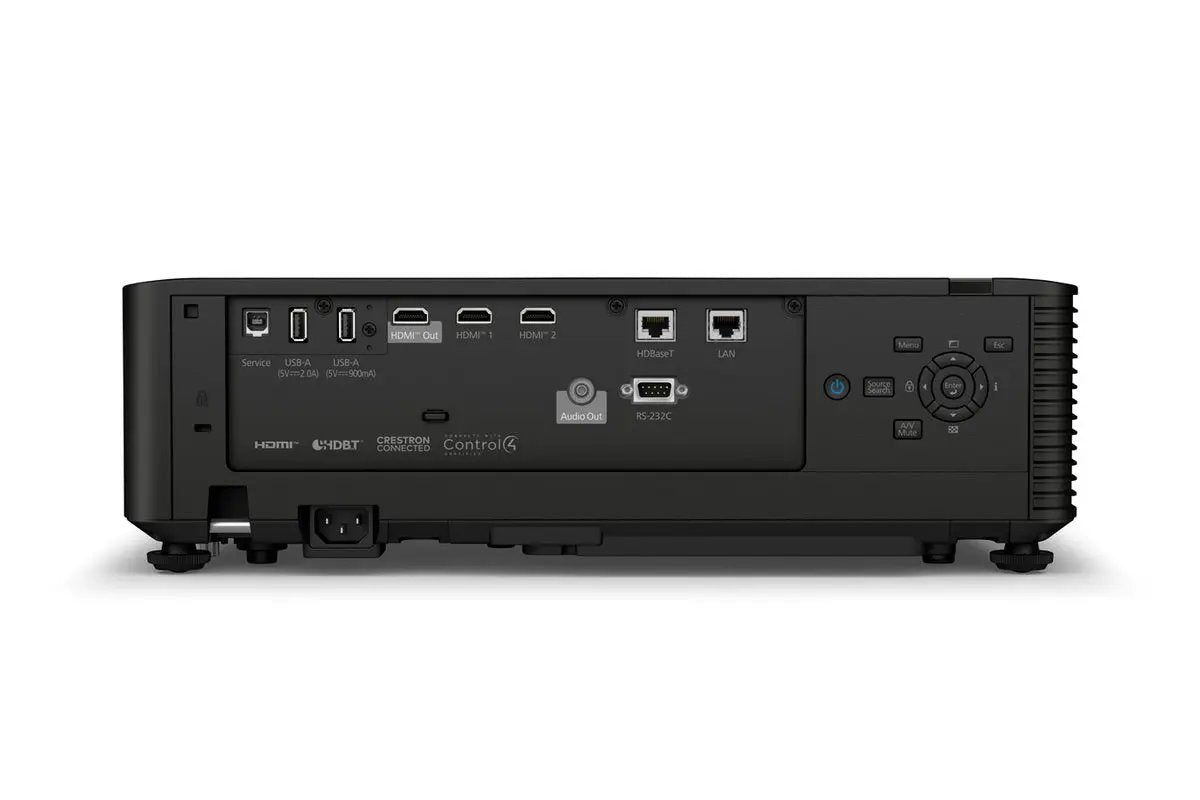
The most important features for a hybrid workspace are brightness, image clarity, easy connectivity, flexible placement, and remote management. In rooms used for both in-person meetings and video collaboration, the projector needs to stay visible with lights on and integrate well with modern AV systems. The Epson PowerLite L695SE checks many of those boxes. It offers 6,000 lumens for bright rooms, 4K Enhancement for sharper detail, and short-throw projection for spaces where the projector must sit closer to the screen. It also includes HDMI, HDMI Out, HDBaseT, VGA, RJ-45, RS-232, and wireless networking with Wi-Fi 6 and 6E. For IT teams, Epson Projector Management Connected and over-the-air firmware alerts help support fleet management. This type of projector is best for organizations that need clear visuals for presentations, video conferencing, and collaborative content sharing. If your workspace has limited throw distance and requires centralized monitoring across multiple rooms, these features become especially valuable.
Yes, it is a good fit for multi-projector environments and professionally integrated spaces. The key reason is that it includes several installation features that simplify alignment and system control, which are essential when more than one projector is being used. The Epson PowerLite L695SE supports built-in edge blending, point correction, arc correction, and Quick Corner, all of which help installers create a cleaner combined image across multiple projectors or adapt the image to challenging surfaces. It also supports 360-degree mounting, wired network control, HDBaseT connectivity, and an optional attachable PixAlign camera for simplifying more complex multi-projector setups. This makes it well suited for lecture halls, immersive displays, corporate briefing centers, training rooms, and other spaces where image geometry and remote management matter. If you only need a basic single-projector installation in a simple room, some of these advanced tools may be more than you need. For integrated AV projects, though, they are highly useful.
For a professional 4K laser projector, look for a mix of modern video inputs, network control, and installation-friendly signal transport. The most useful options typically include HDMI, HDBaseT, LAN control, RS-232, and wireless networking if the projector will be used in flexible or shared spaces. The Epson PowerLite L695SE includes HDMI, HDMI Out, VGA, HDBaseT, RJ-45, and RS-232, giving it broad compatibility with current and legacy AV systems. It also supports Wi-Fi 6 and 6E for fast wireless connectivity, plus NFC for streamlined fleet installation. For ongoing administration, Epson Projector Management Connected and firmware update alerts help IT and AV teams monitor and maintain units remotely. These features matter most in business and education settings where projectors must connect to multiple source types and fit into managed infrastructure. If you are planning a permanent install, HDBaseT and network control are particularly valuable. If you need easier room-to-room flexibility, the wireless features become more important.

The Epson PowerLite L695SE is a 6000-lumen 4K laser projector built for conference rooms, hybrid workspaces, and other installations that need a short throw ratio of 0.5 to 0.7. It uses 3-chip 3LCD technology for full-time color brightness and 4K Enhancement for sharper detail than standard HD projection. Compared to standard throw models, it delivers large, bright images from a shorter distance, making it a practical fit for tight rooms and collaborative spaces.

  • 6,000 lumens for clear images in well-lit meeting rooms and classrooms
  • Short-throw 0.5 to 0.7 ratio helps create large images with less installation distance
  • 4K Enhancement technology improves detail for presentations, dashboards, and video content
  • Horizontal and vertical lens shift support flexible placement and easier alignment
  • Built-in geometric correction tools include point correction, arc correction, edge blending, and Quick Corner
  • Connectivity includes HDBaseT, HDMI, HDMI Out, VGA, RJ-45, RS-232, NFC, and Wi-Fi 6/6E

For IT teams and AV integrators, the PowerLite L695SE supports 360-degree mounting, over-the-air firmware alerts, and Epson Projector Management Connected for remote monitoring and control. An optional PixAlign camera can simplify multi-projector installations. Unlike many projectors that require longer throw distances or external adjustment tools, this model is designed for efficient deployment in boardrooms, training spaces, lecture environments, and digital signage applications where image quality, placement flexibility, and network management all matter.

Customer reviews

Poor
Good

Max 4096 symbols

Accepts .jpg, .png and .webp (10Mb max size)

Be the first to write a review

No reviews yet

No reviews match the selected filter.

Customer reviews

Poor
Good

Max 4096 symbols

Accepts .jpg, .png and .webp (10Mb max size)

Be the first to write a review

No reviews yet

No reviews match the selected filter.